‏הצגת רשומות עם תוויות VMware. הצג את כל הרשומות

יום חמישי, 24 באפריל 2014

UNABLE TO LOGON VMWARE VCENTER APPLIANCE WITH ROOT

Symptoms

  • You are unable to log into the root account for the vCenter Server Appliance (vCSA).
  • The root account for the vCSA is locked.

Purpose

This article provides instructions on preventing the forced lockout of the root account and on unlocking a locked root account.

Cause

The 5.5 release of the vCenter Server Appliance (vCSA) enforces local account password expiration after 90 days by default. This policy locks out the root account when the password expiration date is reached.

Resolution

This behavior affects vCenter Server Appliance 5.5.

Prevent forced lockout when the root account is still active

If the root account is still accessible through the vCSA console or via the secure shell (SSH), you can prevent this issue from occurring by modifying the /etc/cron.daily/pass-expiration script.

To prevent the forced lockout when the root account is still active:

  1. Log in to the vCSA as the root user.
  2. Open the /etc/cron.daily/pass-expiration script in a text editor.
  3. Replace the commands at the bottom of the script to replace the forced lockout with a forced password change:

    1. Delete these commands:

      # disable the password if it's time and not already done.
      # don't rely on the pam account facility. prepend an x in the shadow file.
      if [ $TODAY -ge $DEADLINE ] && ! grep -q 'root:x' $SHADOW; then
         sed -e 's/^root:\(.*\)/root:x\1/' $SHADOW -i
      fi

    2. Enter these commands:

      # force a password change for root if we've reached the password expiration date.
      # pam.unix2 doesn't do this the way we would like, so we do this instead.
      if [ $TODAY -ge $DEADLINE ]; then
         chage –d 0 root
      fi
  4. Save and close the file.

Unlocking a locked out root account

If the root account is not accessible via the console, the secure shell, and the Virtual Appliance Management Interface (VAMI), the root account has been inactivated due to password expiration. To reactivate the root account, the vCSA must be rebooted and the kernel option modified in the GRUB bootloader to obtain a root shell.

To reactivate the root account:

  1. Reboot the vCSA using the vSphere Client.
  2. When the GRUB bootloader appears, press the spacebar to disable autoboot.


    Note: If the time between when you power on the virtual machine and when it exits the BIOS or EFI and launches the guest operating system is too short, you can adjust the delay. For more information, see Delay the Boot Sequence in the vSphere Client in the vSphere Single Host Management guide.
  3. Type p to access the appliance boot options.
  4. Enter the GRUB password.

    Note:
    • If the vCSA was deployed without editing the root password in the Virtual Appliance Management Interface (VAMI), the default GRUB password is vmware.
    • If the vCSA root password was reset using the VAMI, then the GRUB password is the password last set in the VAMI for the root account.
  5. Use the arrow keys to highlight VMware vCenter Server Appliance and type e to edit the boot commands.


  6. Scroll to the second line displaying the kernel boot parameters.


  7. Type e to edit the boot command.
  8. Append init=/bin/bash to the kernel boot options.


  9. Press Enter. The GRUB menu reappears.
  10. Type b to start the boot process. The system boots to a shell.
  11. Reset the root password by running the passwd root command.
  12. Restart the appliance by running the reboot command.
  13. Important: Follow the instructions in the Prevent forced lockout when the root account is still active section of this article to prevent future root account lock out and retain password expiration functionality.

Additional Information

The vCSA allows you to establish your own password expiration and warning email policies by using the Admin tab of the Virtual Appliance Management Interface (VAMI).


By default, the password expiration on the local root account in the vCSA is set to 90 days after the password has been changed. This typically occurs at first boot. If the password is not changed on installation, there is a 90-day period before expiration.

Email addresses configured in the Admin tab in the VAMI (https://IP_address:5480 or https://VAMI_host_name:5480) receive email notifications each day for seven days prior to password expiration. The email settings, such as relay SMTP server, are configured through the vSphere Client in the vCenter Server mail settings.  


יום רביעי, 22 בינואר 2014

VMware ESXi Release and Build Number History

The following listings are a comprehensive collection of the flagship hypervisor product by VMware. All bold versions are downloadable releases. All patches have been named by their release names. Please note that the ESXi hypervisor was first available with version 3.5.
[Last Update: December 10, 2013] – If you miss any Build, please drop me a message.

vSphere ESXi 5.5

NameVersionReleaseBuild
ESXi550-2013120015.5.0 Patch 12013-12-221474528
vSAN Beta Refresh5.5.02013-11-251439689
VMware ESXi 5.55.5.02013-09-221331820

vSphere ESXi 5.1

NameVersionReleaseBuild
ESXi510-2013100015.1.0 Patch 62013-10-171312873
ESXi510-2013070015.1.0 Patch 52013-07-251157734
ESXi510-2013050015.1.0 Patch 42013-05-221117900
VMware ESXi 5.1 Update 15.1.0 U12013-04-251065491
ESXi510-2013030015.1.0 Patch 32013-03-071021289
ESXi510-2012120015.1.0 Patch 22012-12-20914609
ESXi510-2012100015.1.0 Patch 12012-10-24838463
KB20347965.1.0Hot-Patch837262
VMware ESXi 5.15.1.02012-09-11799733

vSphere ESXi 5.0

NameVersionReleaseBuild
VMware ESXi 5.0 Update 35.0.0 U32013-10-171311175
ESXi500-2013080015.0.0 Patch 112013-08-291254542
ESXi500-2013050015.0.0 Patch 102013-05-151117897
ESXi500-2013030015.0.0 Patch 92013-03-281024429
VMware ESXi 5.0 Update 25.0.0 U22012-12-20914586
ESXi500-2012090015.0.0 Patch 82012-09-27821926
ESXi500-2012070015.0.0 Patch 72012-07-12768111
ESXi500-2012060015.0.0 Patch 62012-06-14721882
ESXi500-2012050015.0.0 Patch 52012-05-03702118
ESXi500-2012040015.0.0 Patch 42012-04-12653509
VMware ESXi 5.0 Update 15.0.0 U12012-03-15623860
ESXi500-2011120015.0.0 Patch 32011-12-15515841
ESXi500-2011110015.0.0 Patch 22011-11-03504890
ESXi500-2011090015.0.0 Patch 12011-09-13474610
VMware ESXi 5.05.0.02011-08-24469512

vSphere ESXi 4.1

NameVersionReleaseBuild
ESXi410-2013120014.1.0 Patch 132013-12-051363503
ESXi410-2013070014.1.0 Patch 122013-07-311198252
ESXi410-2013040014.1.0 Patch 112013-04-301050704
ESXi410-2013010014.1.0 Patch 102013-01-31988178
ESXi410-2012110014.1.0 Patch 92012-11-15874690
VMware ESXi 4.1 Update 34.1.0 U32012-08-30800380
ESXi410-2012060014.1.0 Patch 82012-06-14721871
ESXi410-2012050014.1.0 Patch 72012-05-03702113
ESXi410-2012040014.1.0 Patch 62012-04-26659051
ESXi410-2012010014.1.0 Patch 52012-01-30582267
VMware ESXi 4.1 Update 24.1.0 U22011-10-27502767
ESXi410-2011070014.1.0 Patch 42011-07-28433742
ESXi410-2011040014.1.0 Patch 32011-04-28381591
VMware ESXi 4.1 Update 14.1.0 U12011-02-10348481
ESXi410-2010110014.1.0 Patch 22010-11-29320137
ESXi410-2010100014.1.0 Patch 12010-11-15320092
VMware ESXi 4.14.1.02010-07-13260247

vSphere ESXi 4.0

NameVersionReleaseBuild
ESXi400-2013100014.0.0 Patch 192013-10-241335992
ESXi400-2013050014.0.0 Patch 182013-05-301070634
ESXi400-2013020014.0.0 Patch 172013-02-07989856
ESXi400-2012090014.0.0 Patch 162012-09-14787047
ESXi400-2012060014.0.0 Patch 152012-06-12721907
ESXi400-2012050014.0.0 Patch 142012-05-03702116
ESXi400-2012030014.0.0 Patch 132012-03-30660575
VMware ESXi 4.0 Update 44.0.0 U42011-11-17504850
ESXi400-2011100014.0.0 Patch 122011-10-13480973
VMware ESXi 4.0 Update 34.0.0 U32011-05-05398348
ESXi400-2011040014.0.0 Patch 112011-04-28392990
ESXi400-2011030014.0.0 Patch 102011-03-07360236
ESXi400-2011010014.0.0 Patch 92011-01-04332073
ESXi400-2010090014.0.0 Patch 82010-09-30294855
VMware ESXi 4 Update 24.0.0 U22010-06-10261974
ESXi400-2010050014.0.0 Patch 72010-05-27256968
ESXi400-2010030014.0.0 Patch 62010-04-01244038
ESXi400-2010020014.0.0 Patch 52010-03-03236512
ESXi400-2009120014.0.0 Patch 42010-01-05219382
VMware ESXi 4 Update 14.0.0 U12009-11-19208167
ESXi400-2009090014.0.0 Patch 32009-09-24193498
ESXi400-2009070014.0.0 Patch 22009-08-06181792
ESXi400-2009060014.0.0 Patch 12009-07-09175625
VMware ESXi 44.0.02009-05-21164009

ESXi 3.5

NameVersionReleaseBuild
ESXe350-201302401-O-SG3.5 Patch 272013-2-21988599
ESXe350-201206401-O-SG3.5 Patch 262012-06-14725354
ESXe350-201205401-O-SG3.5 Patch 252012-05-03702112
ESXe350-201203401-O-SG3.5 Patch 242012-03-09604481
VMware ESXi 3.5 June 2011 Rollup3.5 June 2011 Rollup2011-06-30391406
ESXe350-201105401-O-SG3.5 Patch 232011-06-02391406
ESXe350-201012401-O-BG3.5 Patch 222010-12-07317866
ESXe350-201008401-O-SG3.5 Patch 212010-09-01283373
ESXe350-201006401-O-SG3.5 Patch 202010-06-24259926
ESXe350-201003401-O-BG3.5 Patch 192010-03-29238493
ESXe350-201002401-O-SG3.5 Patch 182010-02-16226117
ESXe350-200912401-O-BG3.5 Patch 172009-12-29213532
VMware ESXi 3.5 Update 53.5 U52009-12-03207095
ESXe350-200910401-I-SG3.5 Patch 162009-10-16199239
ESXe350-200908401-I-BG3.5 Patch 152009-08-31184236
ESXe350-200907401-I-BG3.5 Patch 142009-07-30176894
ESXe350-200906401-I-BG3.5 Patch 132009-06-30169697
ESXe350-200905401-I-BG3.5 Patch 122009-05-28163429
ESXe350-200904401-I-SG3.5 Patch 112009-04-29158874
VMware ESXi 3.5 Update 43.5 U42009-03-30153875
ESXe350-200903411-I-BG3.5 Patch 102009-03-20153480
ESXe350-200901401-I-SG3.5 Patch 92009-01-30143129
ESXe350-200811401-I-SG3.5 Patch 82008-12-02130755
VMware ESXi 3.5 Update 33.5 U32008-11-06123629
ESXe350-200809401-I-SG3.5 Patch 72008-10-03120505
ESXe350-200808501-I-SG3.5 Patch 62008-09-18113338
VMware ESXi 3.5 Update 2 (reissued)3.5 U22008-08-13110271
ESXe350-200807812-I-BG3.5 Patch 52008-08-12110180
VMware ESXi 3.5 Update 2 (timebombed)3.5 U22008-07-25103909
ESXe350-200805501-I-SG3.5 Patch 42008-06-0394430
ESXe350-200804401-O-BG3.5 Patch 32008-04-3085332
VMware ESXi 3.5 Update 13.5 U12008-04-1082664
ESXe350-200802401-I-BG3.5 Patch 22008-03-1076563
ESXe350-200712401-O-BG3.5 Patch 12008-01-17
VMware ESXi 3.5 Initial Release3.52008-01-1070348
VMware ESXi 3.5 First Public Release3.52007-12-3167921

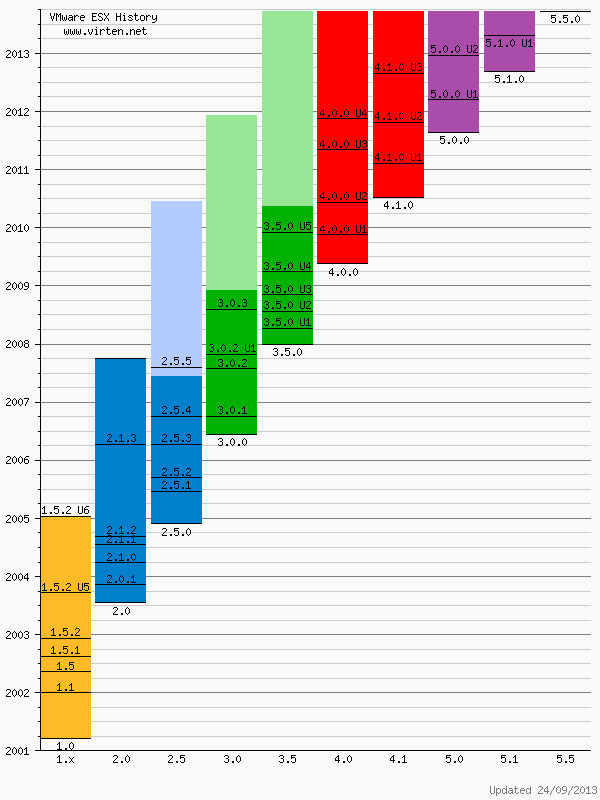
VMware ESX History Diagram

vmware-esxi-build-history
Please note that this is not an official list by VMware. All informations are based on VMware documentation. Some informations or versions are not consistent.

Thanks to: